

SDK integration for password update
DataDome Account Protect detects account takeover threats and protects you against them
Account Protect can be integrated into your backend through SDK packages available on multiple platforms.
Prerequisites for Account ProtectAccount Protect is separate from Bot Protect and is not available on your account by default.
Please contact your account manager to enable it.This service requires a dedicated API key, which will be available on your dashboard once it is enabled.
Main concepts
DataDome Account Protect safeguards all password updates—whether user-initiated, recovery-based, or merchant-forced—by analyzing each attempt and recommending whether to allow or deny it. This real-time protection ensures that only legitimate users can change account credentials, reducing the risk of account takeover and credential abuse.
DataDome supports three customer journeys:
- When a user has forgotten their password (User Journey 1)
- When a user wants to update their password (User Journey 2)
- When the merchant forces a user to reset their password (User Journey 3)
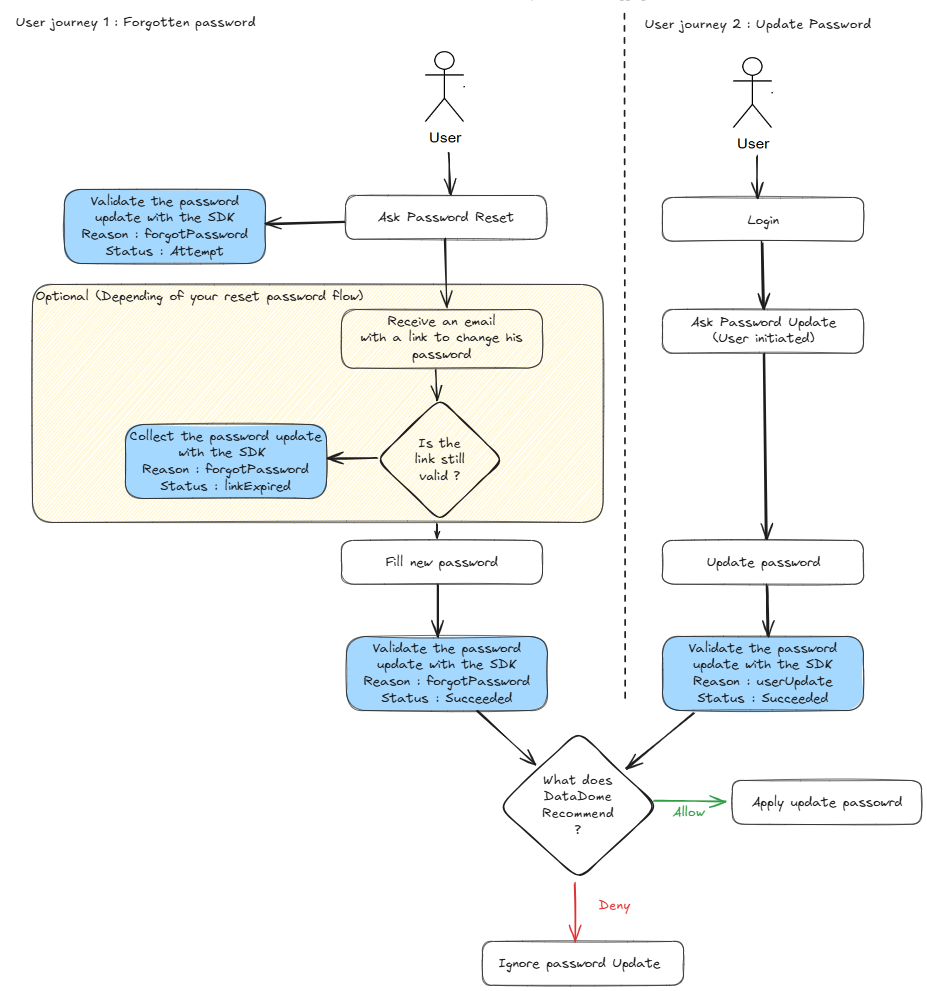
Overview of the implementation flow for a password update (User journey 1 & 2)

Overview of the implementation flow for a password update (User journey 3)
Installation
Upgrading an existing integrationThe Go, Java, and .NET SDKs are now generated from the Account Protect OpenAPI specification, and their latest major versions contain breaking changes. Follow the migration guides to upgrade your integration.
The Account Protect SDK is distributed on multiple platforms:
- Maven package for Java 11+ and Spring Boot 2.x
- Maven package for Java 17+ and Spring Boot 3.x - compatible with Scala 2.12+
- Npm package for Node.js 14+
- NuGet package for .NET 6
- Packagist package for Symfony PHP (8.1+) applications
- Packagist package for Laravel PHP (8.1+) applications
- Pypi package for Python 3.8+
- Ruby gem for Ruby 3.2+
- Go package for Go 1.18+
You can use one of the commands below to install the relevant package for your application:
npm i @datadome/fraud-sdk-nodedotnet add package DataDome.AspNetCore.Fraud.SDK<!-- insert in the pom.xml file of the project -->
<dependency>
<groupId>co.datadome.fraud</groupId>
<artifactId>fraud-sdk-java</artifactId>
<version>3.0.0</version>
</dependency>libraryDependencies += "co.datadome.fraud" % "fraud-sdk-java" % "3.0.0"pip install datadome-fraud-sdk-pythoncomposer require datadome/fraud-sdk-symfony# 1. add `datadome/fraud-sdk-laravel` to your project
composer require datadome/fraud-sdk-laravel
# 2. Generate an autoloader
composer dump-autoload
# 3. Edit `config/app.php` to add `DataDomeServiceProvider`
# config/app.php
use DataDome\FraudSdkLaravel\Providers\DataDomeServiceProvider;
[...]
'providers' => ServiceProvider::defaultProviders()->merge([
[...]
DataDomeServiceProvider::class
# 4. publish `datadome.php` in the `config` folder
php artisan vendor:publishgem install datadome_fraud_sdk_rubygo get github.com/datadome/fraud-sdk-go-package/v2Usage
Using the Account Protect SDK requires changes in your application to send signals regarding password updates and handle the recommendations provided by DataDome's Account Protect API.
Example for an Password Update event
package main

import (
  "log"
  "net/http"
  "time"

  dd "github.com/datadome/fraud-sdk-go-package/v2"
)

func addOpt[T any](opts []T, opt T, err error) []T {
    if err != nil {
        log.Printf("option error: %v", err)
        return opts
    }
    return append(opts, opt)
}

func passwordHandler(client *dd.Client) http.HandlerFunc {
    return func(w http.ResponseWriter, r *http.Request) {
        if r.Method == http.MethodPut {
            email := "[email protected]"
            user := dd.PasswordUpdatePayloadAllOfUser{
                Id: "fake_user_id",
            }

            createdAt := time.Now().Format(time.RFC3339)
            sessionId := "fake_session_id"
            session := dd.Session{
                Id:        &sessionId,
                CreatedAt: &createdAt,
            }

            var opts []dd.PasswordUpdatePayloadOption
            sessionOpt, err := dd.PasswordUpdatePayloadWithSession(session)
            opts = addOpt(opts, sessionOpt, err)

            op, err := dd.NewValidatePasswordUpdate(
                email,
                dd.PasswordUpdatePayloadReasonUserUpdate,
                dd.PasswordUpdatePayloadStatusSucceeded,
                user,
                opts...,
            )
            if err != nil {
                log.Printf("error creating validate password update operation: %v\n", err)
                http.Error(w, "invalid request", http.StatusBadRequest)
                return
            }
            validate, err := op.PerformOperation(r.Context(), client, r, nil)
            if err != nil {
                log.Printf("error during validation: %v\n", err)
            }
            if validate.Action == dd.ALLOW {
                w.WriteHeader(http.StatusOK)
                return
            } else {
                // Business Logic here
                // MFA
                // Challenge
                // Notification email
                // temporarly lock account
                http.Error(w, "failed", http.StatusForbidden)
                return
            }
        }
    }
}

func main() {
  client, _ := dd.NewClient("FRAUD_API_KEY")

  mux := http.NewServeMux()
  mux.HandleFunc("/password", passwordHandler(client))

  _ = http.ListenAndServe(":8080", mux)
}
using DataDome.AspNetCore.Fraud.SDK;
using DataDome.AspNetCore.Fraud.SDK.Api;
using DataDome.AspNetCore.Fraud.SDK.Model;
var appBuilder = WebApplication.CreateBuilder(args);
appBuilder.Services.AddSingleton(_ => Client.Builder("your-api-key").Build());
var app = appBuilder.Build();
app.MapPut("/password", PasswordHandler);
app.Run();
static IResult PasswordHandler(HttpContext ctx, Client client)
{
var email = "[email protected]";
var user = new PasswordUpdatePayloadAllOfUser { Id = "fake_user_id" };
var session = new Session { Id = "fake_session_id", CreatedAt = DateTime.UtcNow };
var builder = new PasswordUpdatePayload.Builder()
.Account(email)
.Reason(PasswordUpdatePayloadReason.UserUpdate)
.Status(PasswordUpdatePayloadStatus.Succeeded)
.User(user)
.Session(session);
var validate = new ValidatePasswordUpdate(builder).Perform(client, ctx.Request, null);
if (validate?.Action == ResponseAction.Allow)
{
return Results.Ok();
}
else
{
// Business Logic here
// MFA
// Challenge
// Notification email
// temporarly lock account
return Results.Problem("failed", statusCode: 403);
}
}const datadomeClient = new DataDome("FraudAPIKey");
app.put('/password', async function (req: Request, res: Response) {
const emailAccount = req.body.email;
const session: Session = { id: 'fake_session_id', createdAt: new Date() };
const user: Pick<User, 'id'> = {
id: 'fake_user_id',
};
const customFields: CustomField[] = [{
name: "customField",
value: "customValue",
}];
const datadomeResponse = await datadomeClient.validate(
req,
new PasswordUpdateEvent({
account: emailAccount,
reason: 'userUpdate',
session,
status: 'succeeded',
user,
customFields,
})
);
if (datadomeResponse?.action == ResponseAction.ALLOW) {
res.status(200).send({ ...user, fp: datadomeResponse });
} else {
// Business Logic here
// MFA
// Challenge
// Notification email
// temporarly lock account
res.status(403).send(datadomeResponse);
}
});package example;
import co.datadome.fraud.Client;
import co.datadome.fraud.ApiException;
import co.datadome.fraud.api.*;
import co.datadome.fraud.model.*;
import jakarta.servlet.http.HttpServletRequest;
import org.springframework.boot.SpringApplication;
import org.springframework.boot.autoconfigure.SpringBootApplication;
import org.springframework.context.annotation.Bean;
import org.springframework.http.ResponseEntity;
import org.springframework.web.bind.annotation.*;
import java.time.Instant;
import java.util.logging.Logger;
@SpringBootApplication
@RestController
public class ExampleApplication {
private static final Logger logger = Logger.getLogger(ExampleApplication.class.getName());
@Bean
public Client fraudClient() {
return Client.builder("your-api-key").build();
}
private final Client client;
public ExampleApplication(Client client) {
this.client = client;
}
public static void main(String[] args) {
SpringApplication.run(ExampleApplication.class, args);
}
@PutMapping("/password")
public ResponseEntity<String> passwordHandler(HttpServletRequest request) {
String email = "[email protected]";
PasswordUpdatePayloadAllOfUser user = new PasswordUpdatePayloadAllOfUser();
user.setId("fake_user_id");
Session session = new Session();
session.setId("fake_session_id");
session.setCreatedAt(Instant.now().toString());
PasswordUpdatePayload.Builder builder = PasswordUpdatePayload.builder()
.account(email)
.reason(PasswordUpdatePayload.Reason.USER_UPDATE)
.status(PasswordUpdatePayload.Status.SUCCEEDED)
.user(user)
.session(session);
try {
Response validate = new ValidatePasswordUpdate(builder).perform(client, request, null);
if (validate.getAction() == ResponseAction.ALLOW) {
return ResponseEntity.ok().build();
} else {
// Business Logic here
// MFA
// Challenge
// Notification email
// temporarly lock account
return ResponseEntity.status(403).body("failed");
}
} catch (ApiException e) {
logger.severe("error during validation: " + e.getMessage());
return ResponseEntity.status(403).body("failed");
}
}
}API Reference
PasswordUpdateEvent
PasswordUpdateEventThe SDK exposes methods to validate password updates that require a PasswordUpdateEvent instance to be sent to the Account Protect API along with the client request itself.
Available properties for this event type are listed below:
| Name | Description | Default value | Possible values | Optional |
|---|---|---|---|---|
| account | The unique account identifier used for the login attempt. | Any string value. | No | |
| accountCreationDate | Date when account was created. | Format ISO 8601 YYYY-MM-DDThh:mm:ssTZD | Yes | |
| customFields | See dedicated custom fields section in the FAQ | Yes | ||
| partnerId | Identify the partner using the solution. | Any string value. | Yes | |
| reason | Reason for the password change. | forcedReset, forgotPassword, userUpdate | No | |
| session.createdAt | Creation date of the session | Format ISO 8601 YYYY-MM-DDThh:mm:ssTZD | Yes | |
| session.id | A unique session identifier from your system | Any string value. | Yes | |
| status | Status of the password change | attempted, failed, succeeded, linkExpired | No | |
| user.id | A unique customer identifier from your system. It has to be the same for all other events sent | Any string value. | No |
Validation response
Validating a password update event should result in a response that can include the following properties:
| Name | Description | Possible Values | Always Defined |
|---|---|---|---|
| action | The recommended action to perform on the login attempt. | allow, deny | Yes |
| errors | A list of objects representing each error with details. Each object will have the properties listed below. | ||
| errors[i].error | A short description of the error. | ||
| errors[i].field | The name of the value that triggered the error. | ||
| eventId | Event identifier associated to this validate event. | A valid UUID. | Yes |
| message | A description of the error if the status is failure or timeout. | Invalid header / Request timed out... | |
| reasons | A list of reasons to support the recommended action. | List of reasons (Any string value.) | |
| score | The level of confidence when identifying a request as coming from a fraudster. Only available in Ruby SDK 2.1.0+, Go SDK v1.1.0+, and Node.js SDK 2.0.0+ | Integer | |
| status | The status of the request to the fraud protection API. | ok, failure, timeout | Yes |
Options
Options can be applied to the SDK during its instantiation.
| Option Name | Description | Default Value |
|---|---|---|
| endpoint | The endpoint to call for the Account Protect API. | https://account-api.datadome.co |
| timeout | A timeout threshold in milliseconds. When an API request times out, the SDK will allow it by default. | 1500 |
You can find usage examples for each platform below:
const instance = new DataDome(apiKey, {
    timeout: 1500,
    endpoint: 'https://account-api.datadome.co',
});
// appsettings.json
// The API key is always required, but can also be passed as
// an environment variable named DataDome__FraudAPIKey
"DataDome": {
"FraudAPIKey": "----",
"Timeout": 1500,
"Endpoint": "https://account-api.datadome.co"
}new DataDomeFraudService(datadomeFraudApiKey,
DataDomeOptions.newBuilder()
.endpoint("https://account-api.datadome.co")
.timeout(1500)
.build()
);datadome_instance = DataDome("FraudAPIKey", timeout=1500, endpoint="https://account-api.datadome.co")val dataDomeFraudService = new DataDomeFraudService(datadomeFraudApiKey,
DataDomeOptions.newBuilder()
.endpoint("https://account-api.datadome.co")
.timeout(1500)
.build()
)// .env
DATADOME_FRAUD_API_KEY='----'
DATADOME_TIMEOUT=1500
DATADOME_ENDPOINT='https://account-api.datadome.co'// .env
DATADOME_FRAUD_API_KEY='----'
DATADOME_TIMEOUT=1500
DATADOME_ENDPOINT='https://account-api.datadome.co'datadome = DataDome.new(1500, 'https://account-api.datadome.co', config.logger)client, err := dd.NewClient(
"FRAUD_API_KEY",
dd.ClientWithEndpoint("account-api.datadome.co"),
dd.ClientWithTimeout(1500),
)FAQ
What happens if there is a timeout on API request?
The SDK has been designed to have minimal impact on the user experience. If the configured timeout is reached, the SDK will cancel its pending operation and allow the application to proceed.
What happens if the API returns an error?
Errors and timeouts are handled the same way by the SDK: it will not interrupt the application and allow it to proceed.
What happens if my API key is incorrect?
Invalid keys are detected when calling the account protect API. The SDK will return an allow response to avoid blocking any login or registration attempt on the application. This response will also have a failure status and a message that describes the problem.
What are Custom Fields
Custom fields allow to send additional data. Up to 10 custom fields can be defined.
Each field is defined by the following
| name | type | description | Required |
|---|---|---|---|
| name | string | name of the custom field | Yes |
| value | string | Yes | |
| type | string | values: Number, String, Phone, email, userId, IP | No |
| isPii | boolean | trueif value contains Personally Identifiable Information | No |
Data type Phone must respect the E.164 format
Updated 16 days ago