

Custom templates
Priority Protect allows you to fully customize the waiting room page shown to visitors when they enter a priority waiting room. Templates are reusable HTML pages that can be assigned to one or more priorities.
Templates are shared across waiting room
A single template can be used by multiple waiting room. Any update to a template will be reflected across all waiting room using it.
Image Hosting
The waiting room system does not store any static assets. Host any images externally (CDN) and reference them via URL in your template.
Creating a Template
- Go to Priority Protect > Templates
- Click + Add Template

- Enter a Name for your template
- Write or paste your custom HTML code in the editor
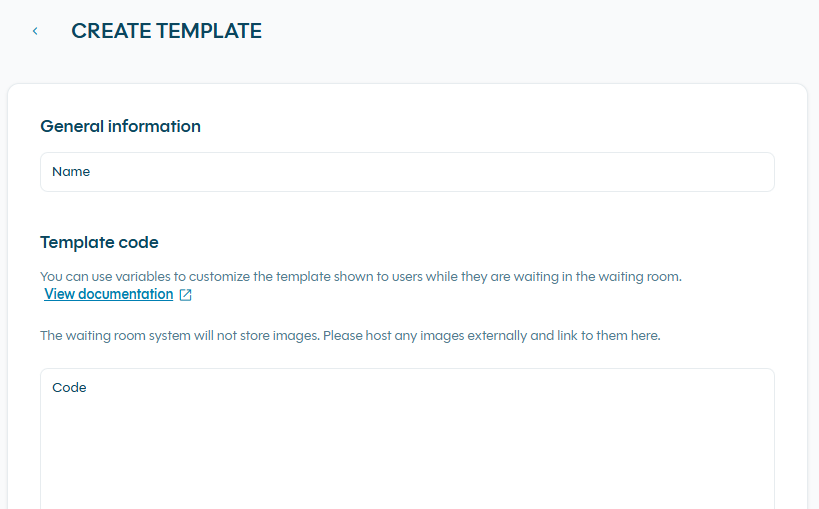
- Click Save. The template will be deployed in a couple of minutes.
Assigning a Template to a Priority
Templates are assigned when creating or editing a waiting room:
- Go to Priority Protect > Priorities
- Create a new priority or edit an existing one
- Select your template in the Waiting Room settings
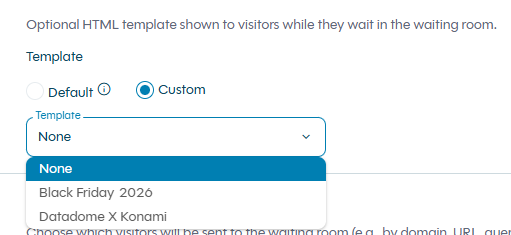
- Click Save. The template will be deployed in a couple of minutes.

Template example
Template Variables
You can use special HTML attributes (data-priorityprotect-var) to dynamically inject real-time data into your waiting room page. Priority Protect automatically updates these values as the visitor's status changes.
How Variables Work ?
Variables are declared as HTML attributes on standard HTML elements:
<span data-priorityprotect-var="position"></span>Priority Protect will automatically populate the content of these elements with live data. For panel variables (divs), they are hidden by default using the hidden class and are only shown when the relevant data is available.
Available variables
openingDatePanel
A container <div> that is hidden by default and only displayed when the priority has a known scheduled opening date. Use it to wrap any content related to the opening date.
<div data-priorityprotect-var="openingDatePanel">
  <!-- Content inside is only shown when an opening date is available -->
  <p>This priority opens on <span data-priorityprotect-var="openingDate"></span></p>
</div>
detailsPanel
A container <div> that is hidden by default and only displayed when the visitor's waiting room position has been successfully retrieved. Use it to wrap position and waiting room size information.
<div data-priorityprotect-var="detailsPanel">
  <p>Your position: <span data-priorityprotect-var="position"></span></p>
  <p>People in waiting room: <span data-priorityprotect-var="size"></span></p>
</div>
Variables Summary
| Variable | Type | Description |
|---|---|---|
| openingDatePanel | div | Shown when opening date is available |
| openingDate | span | Scheduled opening date/time |
| detailsPanel | div | Shown when waiting position is retrieved |
| position | span | Visitor's position in the waiting room |
| size | span | Total size of the waiting room |
| lastUpdateDateTime | span | Date of last data refresh |
| requestId | span | Unique request identifier |
Full Template Example
Here is a minimal but complete example of a working waiting room template:
<!DOCTYPE html>
<html lang="en">
<head>
  <meta charset="UTF-8">
  <meta name="viewport" content="width=device-width, initial-scale=1.0">
  <title>Waiting Room</title>
  <style>
    body {
      font-family: sans-serif;
      display: flex;
      flex-direction: column;
      align-items: center;
      justify-content: center;
      min-height: 100vh;
      margin: 0;
      background-color: #f5f5f5;
    }
    .hidden { display: none; }
    .card {
      background: white;
      border-radius: 8px;
      padding: 40px;
      max-width: 480px;
      text-align: center;
      box-shadow: 0 2px 12px rgba(0,0,0,0.1);
    }
  </style>
</head>
<body>
  <div class="card">
    <h1>You're in the waiting room</h1>
    <p>Please wait while we process your request.</p>

    <!-- Shown only when opening date is available (Scheduled priorities) -->
    <div data-priorityprotect-var="openingDatePanel">
      <p>Access opens on: <strong><span data-priorityprotect-var="openingDate"></span></strong></p>
    </div>

    <!-- Shown only when waiting room position is retrieved -->
    <div data-priorityprotect-var="detailsPanel">
      <p>Your position: <strong><span data-priorityprotect-var="position"></span></strong></p>
      <p>People ahead of you: <strong><span data-priorityprotect-var="size"></span></strong></p>
    </div>

    <p><small>Last updated: <span data-priorityprotect-var="lastUpdateDateTime"></span></small></p>
    <p><small>Request ID: <span data-priorityprotect-var="requestId"></span></small></p>
  </div>
</body>
</html>
API Management
Templates can also be managed programmatically via the Priority Protect API.
Limitations
| Limit | Value | Details |
|---|---|---|
| Template size | 50 KB | Per template, uncompressed. Keeping templates lightweight ensures optimal loading time for visitors in the waiting room |
| Templates per workspace | 15 | Consider reusing a single template across multiple priorities when possible |
| Propagation delay | Up to 5 minutes | After saving a template, changes may take up to 5 minutes to be fully propagated and reflected across all associated waiting rooms |
FAQ
How can I test a custom template ?
When creating or modifying a custom waiting room template, it is important to validate its appearance and behavior in a controlled environment before rolling it out to your production traffic.
The recommended way to safely test a template is to use a dedicated waiting room on your test or staging environment :
1. Create a new waiting room scoped to your test or staging environment (e.g., targeting your staging domain or a specific URL path used for testing).
2. Assign your custom template to that waiting room in the Priority Protect settings.
3. Trigger the waiting room on your staging environment to preview the template as your end users would experience it, including dynamic variables such as queue position and opening date.
4. Once you are satisfied with the result, assign the validated template to your production waiting rooms.
Updated 4 months ago