

Getting started
What is Priority Protect?
Priority Protect is DataDome's virtual waiting room solution that enables you to manage high-traffic surges and protect your critical infrastructure during peak demand periods.
Unlike traditional queue systems, Priority Protect combines traffic management with DataDome's advanced bot detection, ensuring your priority contains only legitimate human visitors.
Prerequisites
Priority Protect is an add-on of Bot Protect and is not available on your account by default.
Contact your account manager to enable it.
Minimum Integration Versions
Server Side Integrations
Priority Protect requires minimum versions of DataDome's integration modules. Please ensure your integration meets or exceeds these versions:
| Platform | Minimum Version | Release Date |
|---|---|---|
| Akamai | 2.1.0 | 2026-02-03 |
| Apache | 2.56.0 | 2026-05-28 |
| Bunny | 1.3.0 | 2026-06-02 |
| CloudFlare | 2.3.0 | 2026-01-26 |
| CloudFront (Node.js) | 1.26.0 | 2026-01-21 |
| CloudFront (Python) | 1.5.0 | 2026-01-23 |
| Envoy | 2.6.0 | 2026-05-29 |
| Fastly | 2.28.0 | 2026-01-15 |
| F5 | 1.10.0 | 2026-06-02 |
| Go | 2.4.0 | 2026-06-02 |
| Google Cloud Load Balancer | 1.6.0 | 2026-06-02 |
| HA Proxy LUA | 1.4.0 | 2026-06-02 |
| IIS | 3.4.0 | 2026-01-27 |
| Java | 2.4.0 | 2026-06-02 |
| Magento | 1.2.244 | 2026-06-01 |
| Nginx | 2.51.0 | 2026-01-15 |
| Node.js | 2.5.0 | 2026-06-01 |
| Traefik | 1.2.0 | 2026-06-02 |
If you're running an older version of your DataDome integration module, you'll need to upgrade before implementing Priority Protect. Contact your Customer Success team for upgrade assistance.
Mobile SDK (if applicable)
| Platform | Minimum Version | Release Date |
|---|---|---|
| iOS | 3.8.5 | 2025-12-12 |
| Android | 3.0.7 | 2025-12-09 |
| React Native + Fetch | 2.0.4 | 2026-02-10 |
| Flutter +Dio | 3.4.1 | 2026-03-12 |
| React Native + SuperAgent | 1.2.1 | 2026-03-19 |
| React Native + Navigation | 1.1.1 | 2026-03-05 |
| React Native + Fetch | 2.0.4 | 2026-01-27 |
Create your first waiting room in less than 5 minutes
-
Go to the Priority Protect section in your DataDome Dashboard.
-
Click Create Priority.
-
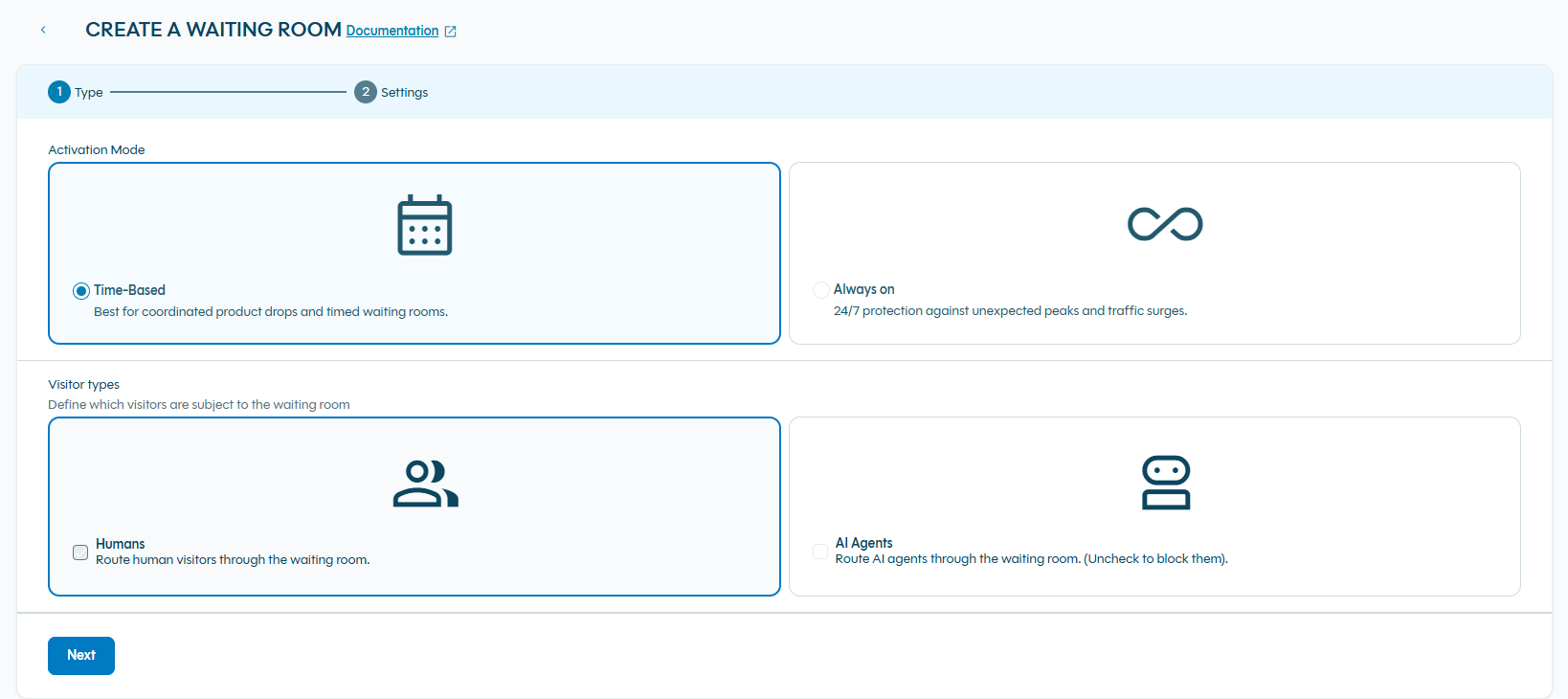
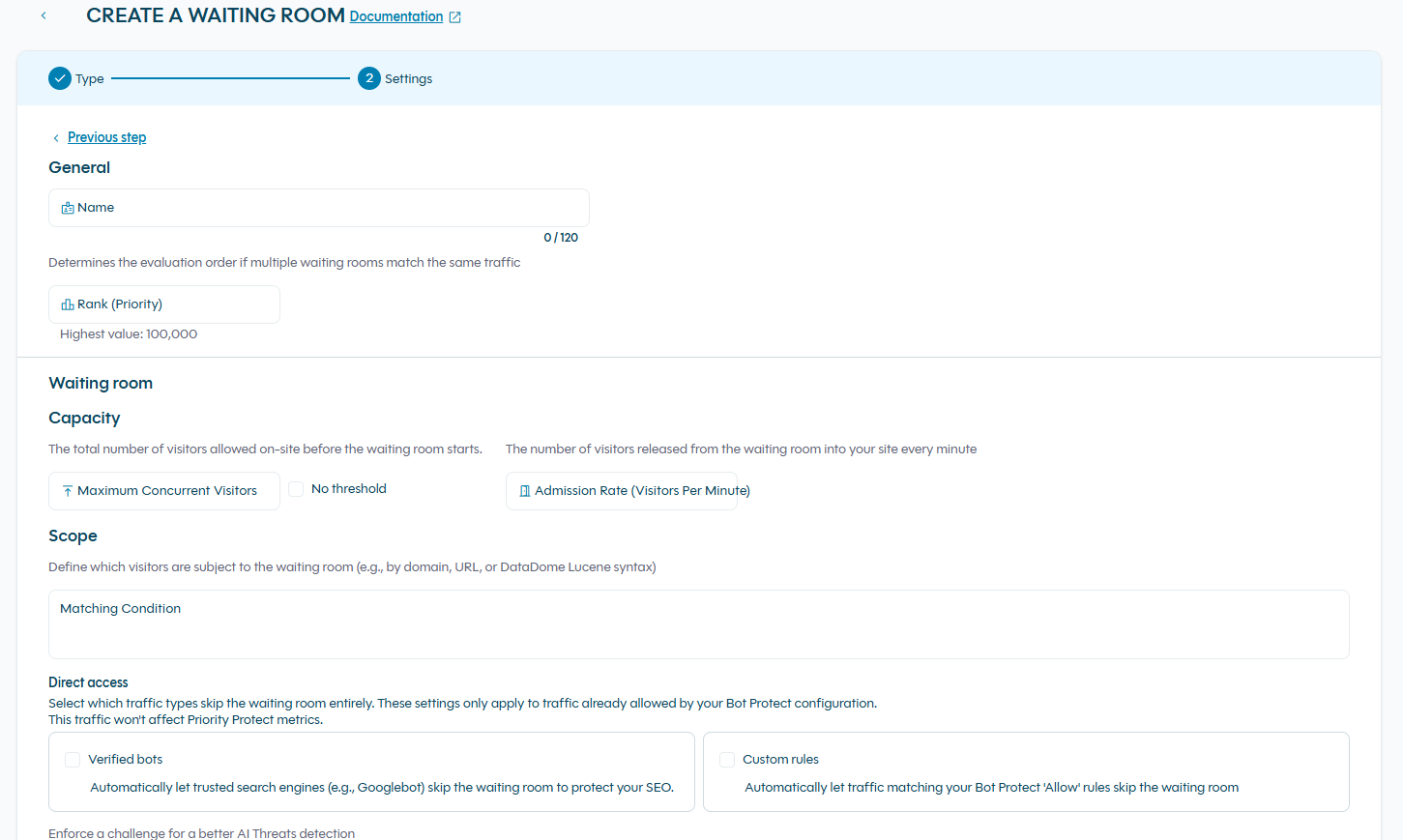
Follow the 2-step wizard:
- Step 1 – Type: Choose Activation Mode and Visitor Types.
Step 2 – Settings: Define name, capacity, matching condition, etc.
Concept
Priority Types
Always-On waiting room
24/7 protection against unexpected peaks and traffic surges. This waiting room will be enable automatically when the number of visitors of your website reach a defined threshold.
Scheduled waiting room
Activate waiting room protection for specific time windows around known high-traffic events. Best for: Product drops, flash sales, event ticket releases
Understanding Capacity Settings
Two key parameters control how Priority Protect manages traffic to your site:
Maximum Concurrent Visitors
The total number of visitors allowed on your protected pages at any moment before new visitors enter the waiting room.
Think of it as: Your "room capacity"
How to set it: Base this on your infrastructure capacity - how many concurrent users your servers, database, and backend services can comfortably handle without performance degradation.
Example: With a limit of 10,000:
- At 9,999 visitors → new visitors admitted immediately
- At 10,000 visitors → new visitors placed in waiting room
- Visitors leave → next person in queue is admitted
Release Rate Per Minute (Admission Rate)
The maximum number of visitors admitted from the queue to your site each minute.
Think of it as: Your "door size"
How to set it: Typically 5-10% of your maximum concurrent visitors. Start conservative and adjust based on real-world performance.
Example: With a release rate of 500/minute and max capacity of 10,000:
- Up to 500 visitors per minute move from priority to your site
- Prevents sudden traffic spikes when capacity opens up
FAQ
What if my integration version doesn't meet the minimum requirements?
You'll need to upgrade your DataDome integration module before implementing Priority Protect. Contact your Technical Account Manager who can assist with the upgrade process and ensure compatibility with your infrastructure.
Can I use Priority Protect with my existing DataDome setup?
Yes! Priority Protect integrates seamlessly with your existing DataDome Bot Protect deployment, provided your integration module meets the minimum version requirements. No re-architecture required.
The waiting room is not being triggered. How do I debug this?
If visitors are not being redirected to the waiting room as expected, check the following:
- Verify your integration version - Ensure your DataDome module meets the minimum version required for Priority Protect. See the Prerequisites section for the minimum version per platform.
- Check your matching condition - Make sure the URL or domain being accessed matches the condition configured in your waiting room.
- Check your current visitor count - The waiting room only triggers when the number of concurrent visitors exceeds your configured Maximum Concurrent Visitors threshold. If your current traffic is below this limit, visitors will be admitted directly without going through the waiting room. Review your real-time metrics in the Dashboard to verify whether the threshold is being reached.
- Confirm the waiting room is enabled - Verify that your waiting room status is set to Activated in the Dashboard. A deactivated priority will not trigger the waiting room regardless of traffic levels.
What happens to bots that try to access my waiting room?
DataDome's bot protection runs first, blocking or challenging malicious bots before they can enter your waiting room. This keeps your waiting room clean and efficient.
Can I customize the waiting room experience?
Yes! Priority Protect offers customizable waiting room templates where you can add your branding, messaging, and custom content.
Can I switch between Dashboard and API management?
Yes! You can use both methods interchangeably. Changes made through either interface are immediately reflected across both. This gives you flexibility to use the right tool for each situation.
Updated about 1 month ago